AI project management tools are reshaping how teams plan, track, and deliver work by combining automation, predictive insights, and natural-language assistance inside a single workspace. Instead of manually updating spreadsheets or chasing status updates across five different apps, teams can now ask an AI assistant to summarize a sprint, flag a slipping deadline, or draft a stakeholder update in seconds. This guide walks through what these platforms actually do, the features worth prioritizing, and how organizations — from solo freelancers to government contractors — are putting them to work in 2026.
Quick answer: AI project management tools automate scheduling, risk detection, and reporting using machine learning layered on top of traditional task boards. The best ones also secure sensitive project data through role-based access and governance controls, which matters as adoption grows across regulated industries.
What Are AI Project Management Tools?
AI project management tools are software platforms that use machine learning and generative AI to automate planning, track progress, surface risks, and generate reports with little manual input. In practice, this means a project manager can ask the system a question in plain language — "what's blocking the Q4 launch?" — and receive a synthesized answer pulled from tasks, documents, and conversation history.
These platforms typically build on the same foundation as classic project management software: boards, timelines, and resource calendars. However, the AI layer adds pattern recognition that spots schedule risks before they become visible in a status report. As a result, teams spend less time compiling updates and more time acting on them.
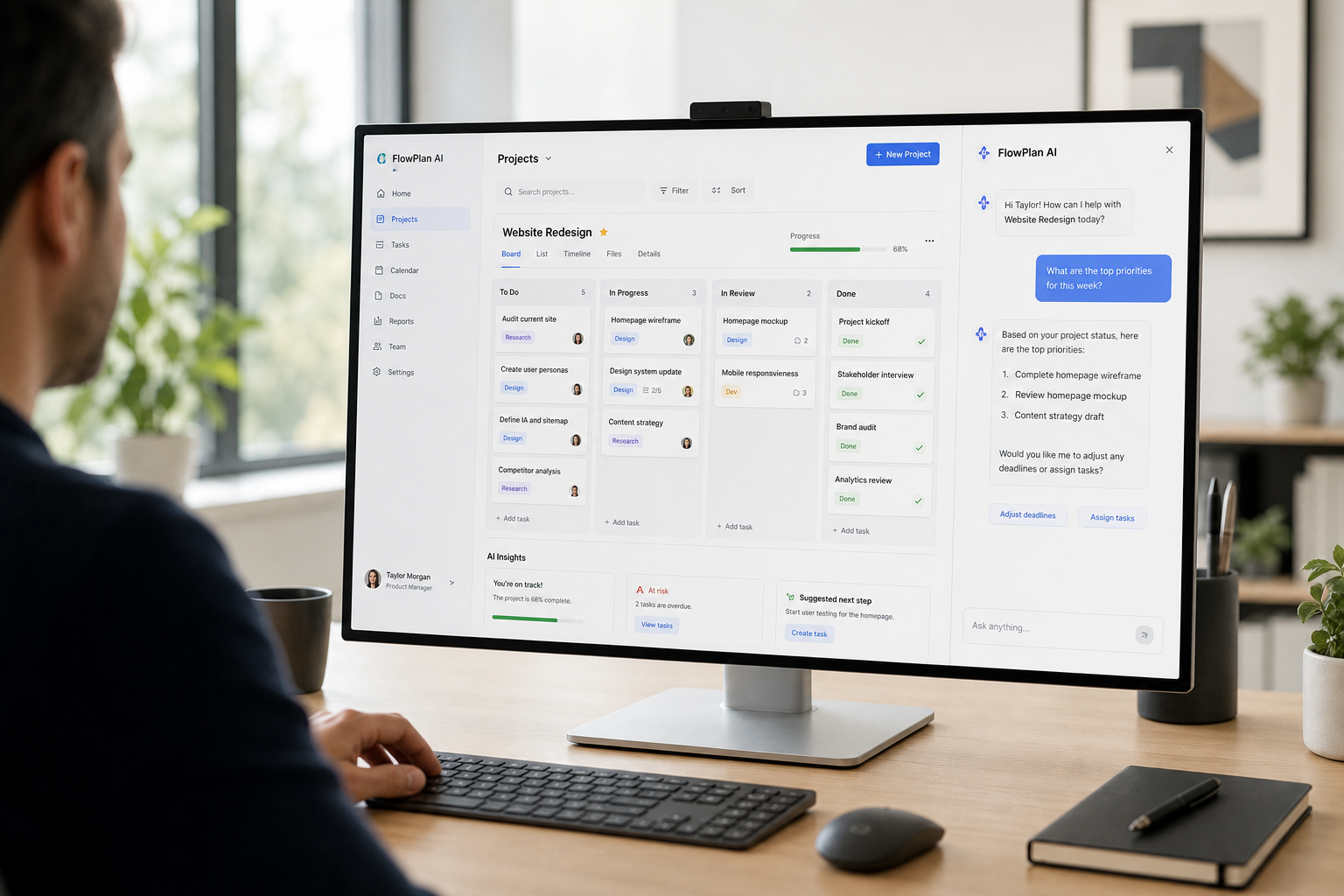
A typical interface for AI project management tools blends task boards with a conversational assistant.
Why Teams Are Switching to AI-Driven Project Management
Distributed teams are the norm now, and that shift has made manual status collection impractical. Specifically, when contributors work across time zones, waiting for a synchronous standup to surface a blocker wastes days. In contrast, an AI-driven project management layer can flag the same blocker the moment a dependency slips.
In fact, a widely cited 2019 Gartner forecast predicted that AI would eliminate 80% of today's traditional project management tasks, such as data collection and status reporting, by 2030. Furthermore, the Project Management Institute has long tracked how administrative overhead — not strategic decision-making — consumes the bulk of a project manager's week. Consequently, tools that automate the administrative layer free up capacity for the judgment calls that actually require a human.
Therefore, the appeal isn't novelty. It's reclaimed time. Teams adopting these platforms consistently report fewer status meetings and faster identification of at-risk deliverables, according to industry surveys published by the Project Management Institute.
Key Features to Look for in AI Project Management Tools
Not every platform labeled "AI-powered" delivers meaningful value. When evaluating AI project management tools, a few capabilities separate genuinely useful platforms from surface-level additions.
Persistent Memory and Knowledge Base Search
A strong platform remembers context across sessions instead of forgetting prior conversations the moment a tab closes. This persistent memory, paired with knowledge-base search (often called retrieval-augmented generation, or RAG — a technique that lets an AI pull facts from your own documents before answering), means the assistant can reference past decisions accurately rather than guessing. AODex, for example, structures project knowledge this way; you can see how project libraries are organized in the AODex projects documentation, and how teams collaborate within shared workspaces in the teams and invitations guide.
Security and Governance for Enterprise and Government Teams
Security is often the deciding factor once a tool moves beyond a pilot team. Look for PII tokenization (which masks sensitive identifiers before data reaches a model), content guardrails, and detection for jailbreak or prompt-injection attempts. For regulated organizations, standards published by the National Institute of Standards and Technology around post-quantum cryptography are becoming relevant, since classical encryption may eventually be vulnerable to future quantum computing attacks.
Platforms built for government, intelligence, and defense industrial base organizations typically go further, supporting IL5-deployable environments, CMMC Level 3 alignment, and air-gapped or SCIF-capable deployments for classified work. Administrators managing these environments can review setup steps in the organization onboarding documentation.
How to Implement AI Project Management Software in Your Workflow
Rolling out new AI project management software works best as a staged process rather than an all-at-once switch. Below is a practical sequence many teams follow.
- Audit current workflows. Map out existing project tracking methods, identify repetitive manual tasks, and note where delays or miscommunication occur most often before selecting any tool.
- Define security and access requirements. Determine who needs access to which projects, whether sensitive data requires tokenization, and what compliance standards your organization must meet.
- Pilot with one team. Roll out the platform to a single team first, gather feedback on accuracy and usability, and adjust configurations before a wider launch.
- Connect integrations and knowledge sources. Link the platform to existing documents, CRM records, and communication tools so the AI assistant can search and reference accurate, up-to-date information.
- Train staff and monitor adoption. Provide short training sessions on effective prompting, then track usage metrics and adjust permissions or workflows based on real feedback.

A phased rollout of AI project management software tends to outperform an all-at-once switch.
AI Project Management Tools vs. Traditional Project Management Software
Traditional project management software is primarily a system of record. It stores tasks, deadlines, and files, but someone still has to manually review that data to spot a problem. AI project management tools, by contrast, actively interpret the data and surface insights without being asked.
For example, a traditional tool shows that a task is three days overdue. An AI-enabled tool, however, can explain why — perhaps a dependency stalled — and suggest a mitigation before the delay cascades into other workstreams. Similarly, traditional reporting requires someone to compile a status update; AI-generated summaries can draft that same update automatically, pulling from recent activity across the project.
That said, AI features work best when the underlying project data is clean and consistently maintained. In other words, AI augments good project management discipline rather than replacing the need for it entirely.
Choosing the Right AI Project Management Platform for Your Team
The right choice depends heavily on team size, industry, and data sensitivity. Individuals and freelancers often just need a lightweight assistant with persistent memory and simple task tracking. Growing businesses, meanwhile, usually need something broader — a system where projects connect directly to CRM, HR, finance, and inventory data rather than living in isolation.
Eden Biz, for instance, folds a Projects module into a wider business management suite alongside CRM, HR, finance, procurement, and document management on a single data layer, which is worth reviewing on the Eden Biz overview if your project data needs to connect to the rest of the business. Developers evaluating spec-driven, AI-assisted workflows may also find value in DevFlow's approach to atomic commits and verification, which applies similar AI-assistance principles to software delivery specifically.
Above all, prioritize platforms that let you route tasks across multiple AI models rather than locking you into one provider, since model performance and pricing shift constantly. You can learn more about how a unified gateway approach works by visiting aocyber.ai directly.
Frequently Asked Questions About AI Project Management Tools
What are AI project management tools?
AI project management tools are software platforms that use machine learning and generative AI to automate planning, track progress, and generate reports with minimal manual input. They layer AI features like predictive timelines and natural-language task creation on top of traditional boards and calendars.
How do AI project management tools differ from traditional software?
Traditional software requires manual data entry and status updates, while AI versions can generate summaries, flag risks, and suggest next steps automatically. The AI layer reduces administrative work so teams can focus on execution instead.
Are AI project management tools worth the cost for small teams?
For most small teams, yes, because the time saved on status reporting often outweighs the subscription cost. Many platforms offer tiered pricing, so smaller teams can start with core features and scale up later.
Can AI project management tools integrate with existing business systems?
Most modern platforms offer APIs and integrations that connect with CRM, HR, finance, and document management systems. This lets project data flow into a single operational view instead of sitting in isolated silos.
How long does it take to implement an AI project management platform?
A basic rollout for a small team can take as little as one to two weeks, while enterprise deployments with custom integrations may take one to three months. Timeline largely depends on data migration complexity and security review.
What security risks should I consider before adopting AI project management software?
Key risks include exposure of sensitive data to third-party model providers, weak access controls, and lack of audit trails. Look for platforms with PII tokenization, role-based access, and guardrails that detect prompt injection attempts.
Can government and defense teams use AI project management tools?
Yes, but they generally need deployments built for strict compliance, such as IL5-deployable environments, CMMC Level 3 alignment, and post-quantum cryptography. Air-gapped or SCIF-capable options exist for classified workloads specifically.
What is the most common mistake teams make when adopting AI project management tools?
The most common mistake is turning on every AI feature at once without training staff or cleaning up existing project data first. This often leads to inconsistent adoption and distrust of AI-generated recommendations.
Do AI project management tools replace project managers?
No, they support project managers rather than replace them. AI handles repetitive tracking and reporting tasks, while humans still make judgment calls on priorities and stakeholder relationships.
How much do AI project management tools typically cost?
Pricing varies widely, from affordable individual plans to custom enterprise contracts with dedicated infrastructure and SLAs. Most vendors offer tiered plans based on seat count, storage, and governance features.
What features matter most when comparing AI project management tools?
Prioritize persistent memory, knowledge base search, flexible model access, and strong security governance. Integration capability and role-based permissions also matter significantly for growing teams.
Can AI project management tools work with multiple AI models?
Some platforms route requests through a unified gateway supporting hundreds of models through a single API rather than locking teams into one provider. This flexibility helps teams pick the best model for each task without rebuilding integrations each time.
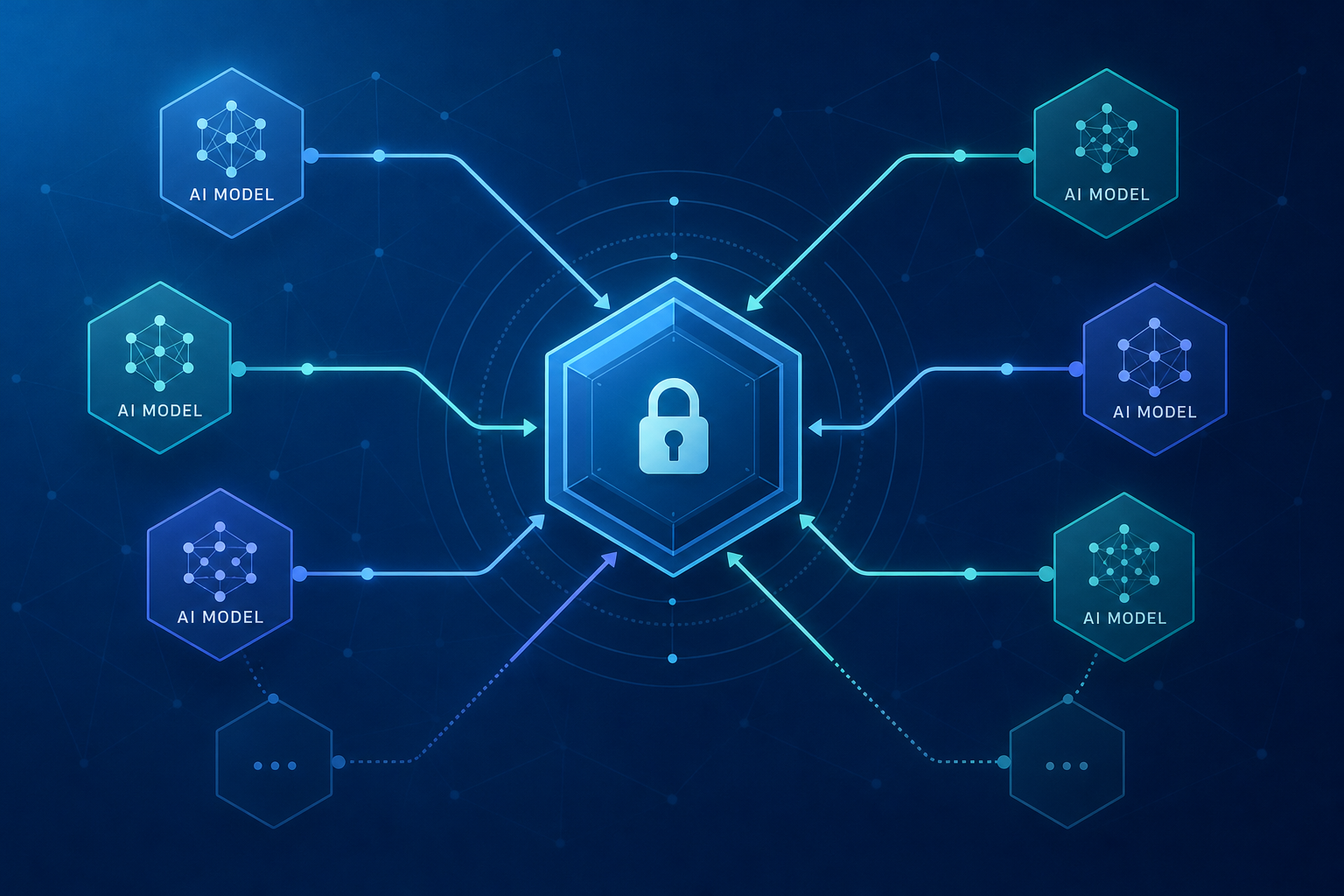
A unified gateway lets AI project management tools draw on many models through one secure connection.
Final Thoughts
AI project management tools have moved well past the experimental stage. They now handle the administrative grind of scheduling, risk detection, and reporting, while leaving strategic decisions to the humans running the project. As this guide has outlined, the strongest platforms combine persistent memory, flexible access to multiple AI models, and governance controls strong enough for regulated industries.
In the end, choosing the right platform comes down to matching features to actual needs rather than chasing the longest feature list. Whether you're a freelancer organizing a handful of client projects or an enterprise coordinating hundreds of contributors, the right AI project management tools should reduce busywork without compromising on data security.

