
A local cloud is a cloud computing environment that runs on infrastructure a business owns, leases, or directly controls, instead of relying entirely on a public provider's shared data centers. Unlike traditional public cloud services, a local cloud keeps data physically closer to the organization that generates it, which matters enormously for privacy, compliance, and speed.
Businesses are rethinking where their data actually lives. In particular, companies handling sensitive records, regulated industries, and government contractors are moving workloads toward infrastructure they can see, touch, and audit. This guide explains what a local cloud is, how it compares to public and private alternatives, and how to decide whether it fits your organization.
Quick answer: A local cloud combines cloud-style automation and self-service provisioning with hardware that an organization owns or controls on-site or in a dedicated facility. It gives businesses more direct control over data location, access, and compliance than a typical public cloud subscription.
What Is a Local Cloud?
A local cloud is infrastructure that behaves like a public cloud service, offering virtualization, automation, and elastic resource allocation, while physically residing on hardware the organization controls. Consequently, teams get the convenience of modern cloud tooling without handing data custody to an outside vendor.
According to the National Institute of Standards and Technology's SP 800-145 publication, cloud computing is formally defined through five essential characteristics and three service models, a framework that applies equally to public, private, and local deployments. The difference lies not in the technology stack but in who owns and operates the underlying hardware. For that reason, a local cloud is often described as a specific flavor of private cloud, one where "private" also means "nearby."
Many organizations first encounter this concept while trying to reduce dependence on big public providers, as explored in more detail in this guide on building a multi-model AI strategy, which touches on why data location decisions ripple into AI tooling choices as well.

A local cloud setup places compute and storage inside infrastructure the organization directly controls.
Local Cloud vs. Public Cloud: Key Differences
Public cloud providers pool hardware across thousands of customers, which is efficient but means your data sits on shared infrastructure governed by someone else's policies. In contrast, a local cloud dedicates resources to a single organization, so administrators decide exactly how data is stored, encrypted, and accessed.
For example, a healthcare company using a public cloud must trust the provider's compliance certifications and hope they align with regional regulations. A local cloud, however, lets that same company configure controls to match its exact legal obligations. Similarly, latency-sensitive applications often perform better on local infrastructure because data does not need to travel to a distant data center.
That said, public cloud still wins on raw elasticity. Scaling a public cloud environment up or down happens almost instantly, while a local cloud typically requires pre-purchased capacity. As a result, many businesses land on a hybrid approach, something covered further in this comparison of cloud file integration options.
Why Companies Choose Local Cloud Infrastructure
Organizations move to local cloud infrastructure for several concrete reasons, not abstract preferences. Above all, data sovereignty tends to drive the decision, since keeping information within a specific jurisdiction simplifies compliance audits considerably.
In addition, predictable costs matter. Public cloud billing scales with usage, which can spike unexpectedly during traffic surges or large data transfers. A local cloud, on the other hand, carries mostly fixed hardware and staffing costs, making budgeting far more straightforward for finance teams.
Security is another major factor. IBM's Cost of a Data Breach Report found that the global average cost of a data breach reached $4.88 million in 2024, a figure that pushes many security leaders toward architectures they can fully audit. Furthermore, a local cloud reduces the number of third parties with access to sensitive systems, which narrows the attack surface considerably.
Finally, government and defense contractors frequently require air-gapped or tightly controlled environments that public cloud regions simply cannot offer. For those use cases, local cloud deployment is not optional; it is a contractual requirement tied directly to accreditation standards.
How to Build a Local Cloud Setup in 5 Steps
Building a reliable local cloud environment follows a fairly consistent sequence regardless of company size. The steps below outline the core process most IT teams follow.
- Assess workloads and data requirements. Identify which applications, files, and AI workloads need to move to a local cloud, and document any compliance or residency rules that apply.
- Choose hardware and a virtualization layer. Select servers, storage, and networking equipment sized for current needs plus growth, then pick a virtualization or container platform.
- Design network and access controls. Set up segmented networks, role-based permissions, and encryption so only authorized users and services can reach sensitive systems.
- Deploy monitoring and security guardrails. Install logging, intrusion detection, and content guardrails so administrators can track activity and respond quickly to incidents.
- Test, document, and plan for scale. Run failover and backup tests, document recovery procedures, and plan hardware capacity increases ahead of demand.
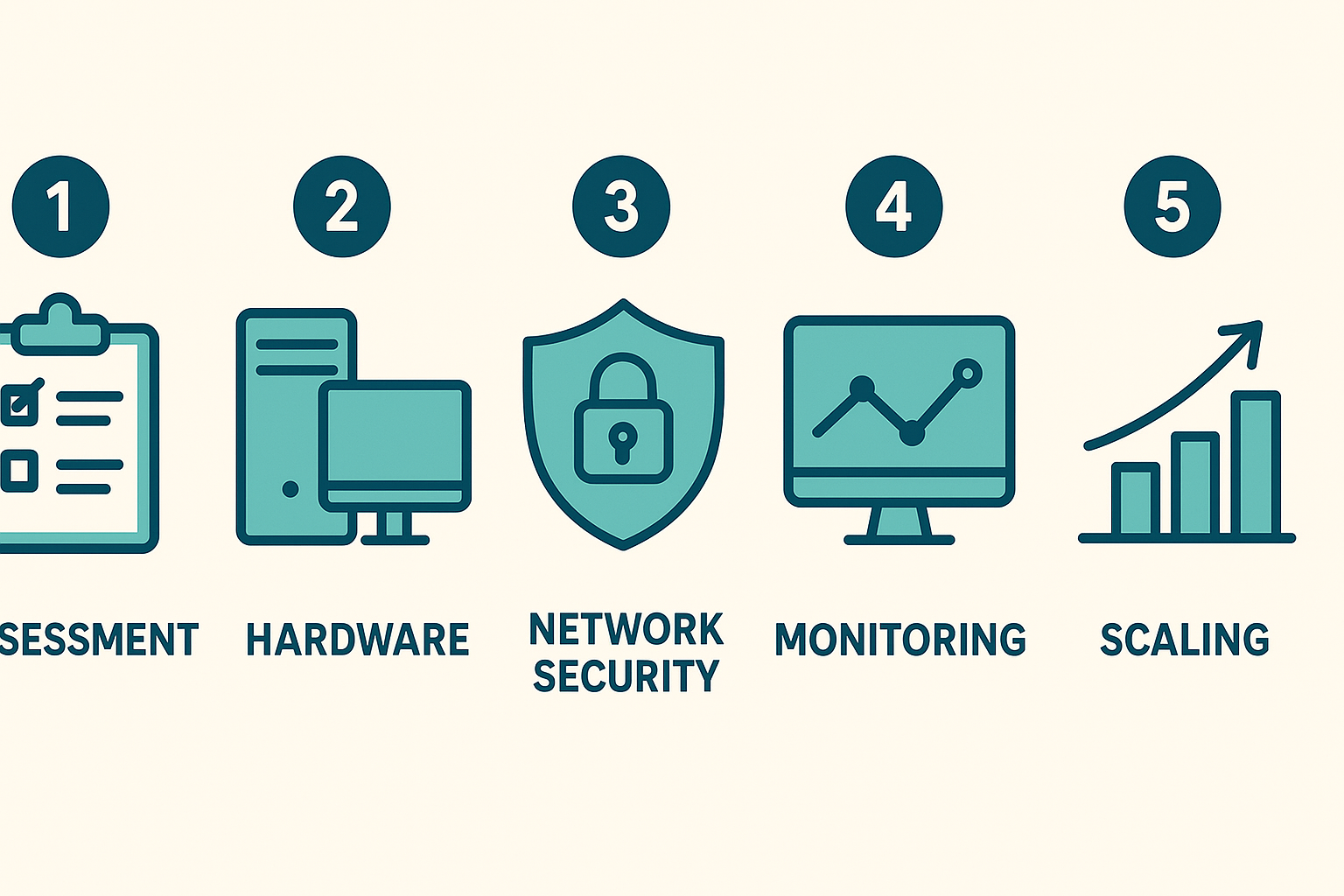
Building a local cloud follows a predictable sequence from assessment through ongoing scaling.
Local Cloud Security and Compliance Benefits
Security teams generally favor local cloud deployments because every control point sits within reach. For instance, patching schedules, firewall rules, and encryption keys stay under internal management rather than depending on a vendor's release calendar.
Moreover, compliance frameworks such as CMMC and government IL5 requirements often mandate specific physical and procedural controls that are easiest to satisfy with dedicated, local infrastructure. The Cybersecurity and Infrastructure Security Agency publishes extensive guidance on securing on-premises and hybrid environments, which remains a useful reference for teams planning a local cloud rollout.
However, a local cloud does not eliminate security work; it shifts responsibility. Consequently, organizations still need strong identity management, continuous monitoring, and incident response planning. Teams that lack in-house security expertise sometimes pair a local cloud with managed governance tooling to close that gap without giving up control of their data.
Local Cloud for AI and Automation Workloads
AI adoption has made local cloud infrastructure newly relevant. Specifically, businesses running large language models or retrieval-augmented search want the benefits of modern AI without exposing prompts, documents, or proprietary data to an outside model provider.
AOCyber's AODex private AI workspace, for example, runs on infrastructure hosted by AOCyber rather than routing conversations through third-party model providers, which keeps persistent memory and knowledge-base search inside a controlled environment. You can review the technical setup in the AODex getting started overview or explore the broader workspace at AOCyber's AODex page.
Government and defense teams face even stricter demands. In those cases, a local cloud paired with CNSA 2.0 post-quantum cryptography and air-gapped, SCIF-capable deployment becomes the baseline requirement rather than an enhancement. Learn more about these capabilities directly at aocyber.ai.
Who Should Consider a Local Cloud?
Not every business needs a local cloud. Small teams with light compliance burdens often do fine on public cloud services. That said, organizations handling regulated data, classified information, or large proprietary datasets typically see the strongest return from local cloud infrastructure, since control and auditability outweigh the convenience of fully managed public services.
Frequently Asked Questions About Local Cloud
What is a local cloud?
A local cloud is a cloud computing environment hosted on infrastructure that an organization owns or directly controls, rather than infrastructure run by a third-party public provider. It delivers cloud-style flexibility while keeping data within a chosen physical or legal boundary.
How is a local cloud different from a public cloud?
A public cloud shares hardware across many customers through a provider like a major hyperscaler. A local cloud instead runs on dedicated hardware controlled by one organization, improving governance and reducing dependence on outside policy changes.
How is a local cloud different from a private cloud?
The terms overlap significantly, but a local cloud usually implies physical proximity, such as on-site hosting, while a private cloud can exist anywhere as long as resources are dedicated to one organization. In practice, most local cloud setups are a subset of private cloud architecture.
Why do businesses choose a local cloud setup?
Businesses choose a local cloud to meet compliance requirements, reduce latency, and avoid unpredictable usage fees. Additionally, it gives IT teams direct oversight of patching, access policies, and data residency decisions.
How much does a local cloud deployment cost?
Costs vary with hardware, staffing, and scale, so organizations should budget for upfront server and storage purchases plus ongoing maintenance. Unlike public cloud billing, local cloud costs stay more predictable since they are not tied to usage-based fees.
How long does it take to set up a local cloud?
A basic local cloud environment can be running within a few weeks, while enterprise-grade deployments often take two to three months. Timelines depend heavily on hardware procurement and security hardening requirements.
What hardware do I need for a local cloud?
At minimum, you need servers for compute, storage arrays for data, and networking equipment to connect everything securely. Larger deployments also require redundant power and cooling to maintain consistent uptime.
Is a local cloud more secure than a public cloud?
A local cloud is not automatically more secure, but it gives an organization full control over configuration rather than relying on a shared provider's defaults. Ultimately, security outcomes depend on how well the environment is maintained and monitored.
What are common mistakes when building a local cloud?
Common mistakes include underestimating storage growth, skipping redundancy planning, and failing to automate patching. As a result, many teams face unplanned downtime or security gaps within the first year of operation.
Can a local cloud scale like a public cloud?
A local cloud can scale, but it requires purchasing additional hardware in advance rather than provisioning resources instantly. Many organizations address this limitation by combining a local cloud with hybrid bursting to public resources during peak demand.
What industries benefit most from a local cloud?
Government, defense, healthcare, and financial services often benefit most because of strict data residency rules. However, any business handling sensitive customer data or proprietary intellectual property can gain meaningful advantages too.
Does a local cloud support AI workloads?
Yes, a local cloud can run AI models and automation entirely within an organization's own infrastructure, which keeps prompts and training data from reaching outside providers. This approach is increasingly common for teams that need persistent memory and private knowledge-base search.
What is the difference between a local cloud and an on-premises server?
A traditional on-premises server typically runs fixed workloads without cloud-style automation, while a local cloud adds virtualization and elastic provisioning on top of owned hardware. In short, a local cloud brings cloud convenience to infrastructure a business physically controls.

Securing access is a central part of operating a dependable local cloud environment.
Final Thoughts on Local Cloud
A local cloud is ultimately about choice: the choice to keep data close, govern it directly, and avoid trading privacy for convenience. As compliance pressure grows and AI workloads become more sensitive, more businesses are weighing local cloud infrastructure against traditional public cloud subscriptions.
In the end, the right answer often blends both worlds, using a local cloud for sensitive data and AI processing while leaning on public services for less critical workloads. Whatever path a business takes, understanding how a local cloud works is the first step toward making that decision with confidence. For organizations exploring privacy-first infrastructure further, aocyber.ai outlines deployment options spanning individuals, enterprises, and government teams alike.

